

 October 26, 2026
 9 min read
Opening your first demat and trading account is a decision you may live with for years. Moving to another broker later is possible, but it can involve transferring holdings, completing KYC again and getting familiar with a new interface. That is why it is worth spending some time getting the decision right the first time.
Most articles on this subject rank trading apps and declare a winner. This one does not. The right platform for an investor who buys three stocks a year may be completely different from the right platform for someone trading intraday every morning.
Instead, this guide focuses on the checks that actually matter, so you can evaluate any trading app — including ours — against your own requirements.
Step 1: Verify SEBI Registration Before Anything Else
This is non-negotiable, and it takes only a couple of minutes.
Every legitimate stock broker in India has a SEBI registration number beginning with INZ, along with membership codes for the exchanges on which it operates. These details should be clearly displayed on the broker’s website and account-opening documents.
Check for:
SEBI registration number — in the format INZ followed by nine digits
Exchange membership codes — NSE, BSE, and MCX or NCDEX if you intend to trade commodities
Depository participant details — a CDSL or NSDL DP ID, since your shares are held with a depository rather than directly with the broker
CIN — the Corporate Identification Number of the registered legal entity
You can verify a broker’s registration directly through the SEBI website.
If an app is being heavily promoted on social media but you cannot find these registration and membership details within a couple of minutes, that should be a warning sign.
Step 2: Add Up What You Will Actually Pay
Advertised brokerage is only one part of your overall trading cost. Before opening an account, ask for the complete schedule of charges and estimate what you are likely to pay based on your own trading pattern.
The costs to consider include:
Account opening charges — a one-time charge that may sometimes be waived
Annual Maintenance Charge (AMC) — charged on the demat account every year, whether or not you trade
Brokerage — charged per order, either as a flat fee or a percentage of turnover; check whether delivery and intraday trades have different rates
DP charges — generally applicable to sell transactions from your demat account and frequently overlooked
Statutory charges — including STT, exchange transaction charges, GST, SEBI turnover fees and stamp duty
Payment gateway charges — some brokers may pass on the cost of adding funds through certain payment methods
A beginner placing four delivery trades a month has a very different cost profile from someone placing forty intraday trades.
So, model your own expected activity rather than relying on an average investor’s cost.
One important point: brokerage charged by a SEBI-registered broker cannot exceed the limit prescribed by SEBI. Any broker making claims around an exemption from the applicable regulatory limits should be approached with caution.
Step 3: Judge Performance, Not Just the Interface
A clean and attractive interface is easy to evaluate from screenshots. Actual performance is much harder to assess — and arguably more important.
Between 9:15 and 9:30 AM, and again during the closing half-hour, trading-system activity can be particularly high. That is precisely when an app needs to remain responsive. A delay in placing or executing an order can result in a different execution price from the one you initially saw.
You cannot properly assess this from an app-store listing. However, you can:
Read recent reviews that specifically mention market-opening performance and check their dates
Open an account and place a few small orders before committing significant capital
Check whether the broker publishes a system-status page or communicates clearly during outages
Look for a web-based trading terminal that can act as a fallback if the mobile app is unavailable
A beautiful interface is useful, but it is not enough. Performance and reliability matter just as much.
Step 4: Check Which Order Types Are Supported
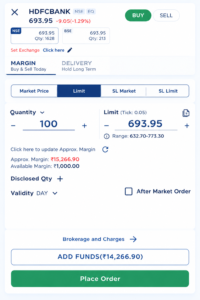
This is an area where some beginner-focused apps can become restrictive. You may not notice the limitation immediately, but it can become important as your trading experience grows.
At a minimum, check whether the platform supports:
Market and limit orders — the basics for buying and selling
Stop-loss trigger orders — useful for defining your risk before entering a position
Intraday and delivery — clearly separated trading products
Good Till Date (GTD) orders — so recurring instructions do not have to be entered again every morning
Bracket orders and trailing stop-loss — useful if you expect to trade actively
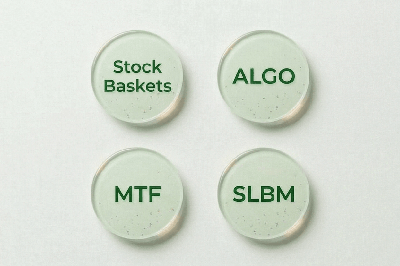
Margin Trading Facility (MTF) — if you intend to use leverage; always understand the applicable interest costs and terms
Equity SIP — useful if you plan to invest a fixed amount in stocks regularly
A platform that only offers basic market and limit orders may become restrictive when you want more flexibility in managing positions and risk.
Step 5: Look at How Money Moves In and Out
Funding and withdrawals are often where beginners experience the most friction.
Before opening an account, check:
Whether funds can be added through UPI as well as net banking
Whether either payment method carries additional charges
Whether multiple bank accounts can be mapped to your trading account
How quickly a payout request is processed
Whether there is a specific payout cut-off time
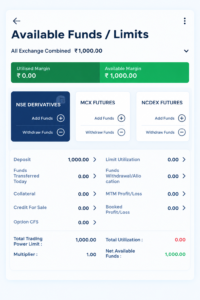
Whether available margin, utilised margin and purchasing power can be viewed conveniently in one place
Remember that funds can only move between your trading account and a bank account held in your own name. This is a regulatory requirement, rather than simply a broker-specific restriction.
Step 6: Check What Research Is Available Inside the App
If a trading app gives you little more than a price and a chart, you may end up using several other websites for research before returning to the app to place your order.
Useful research features can include:
Company profile, sector and business description
Income statement, balance sheet and cash flow statement
Shareholding pattern, including promoter, FII, DII and public holdings
Corporate actions such as dividends, bonuses, splits and rights issues
Key financial ratios and statistics
If an app displays a proprietary score or rating for a company, understand how it is calculated.
A score is simply a summary of available data. It is not a recommendation and should never replace your own review of a company’s financials.
Step 7: Make Sure You Can Access Your Own Records
You will need your trading and investment records at tax time and potentially at short notice.
Make sure the app or broker’s back office allows you to access:
Contract notes for every trade
Ledger and account statements
Holdings and position statements
Profit and loss statements for the financial year
Being able to download the report you need yourself — even at 11 PM on a Sunday — can be more valuable than it initially sounds.
Step 8: Find the Support and Grievance Route Before You Need It
Every broker can appear helpful during the onboarding process. What matters is knowing what happens when something goes wrong.
Check whether the broker clearly publishes:
A Compliance Officer’s name, phone number and email address
An investor grievance contact
A link to SEBI SCORES, the regulator’s complaint-resolution portal
A link to the Smart ODR portal for online dispute resolution
If these details are difficult to find, that itself is useful information when evaluating a broker.
A Checklist You Can Use
CHECK
SEBI registration
INZ number, exchange membership codes, DP ID, CIN
Total cost
Account opening, AMC, brokerage, DP charges, gateway fees
Performance
Behaviour during market open; web-based fallback available
Order types
Stop-loss, GTD, bracket, MTF, Equity SIP
Funds
UPI and net banking, multiple bank accounts, payout timing
Research
Financials, shareholding, corporate actions, ratios
Reports
Contract notes, ledger, holdings, P&L
Support
Compliance Officer, grievance contact, SCORES, ODR
Where Blaze Fits
Blaze is the trading application from SBJ Multicom, a SEBI-registered stock broker operating since 2006, with memberships on NSE, BSE, MCX and NCDEX.
Measured against the checklist above, Blaze provides:
Multiple secure login options, including two-factor authentication, MPIN, fingerprint and face recognition on supported devices
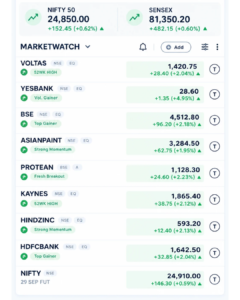
Market Watch with customisable watchlists, price alerts and event tags
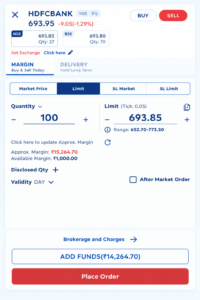
Market, limit, stop-loss, intraday, delivery, PTST, MTF, multileg, spread, GTD, bracket, trailing stop-loss and Equity SIP orders
Holdings and portfolio views covering equity, derivatives, commodities and currency
Fund management with UPI and net banking pay-in, multiple mapped bank accounts and payout requests
In-app research covering company information, financial statements, shareholding patterns, corporate actions, key statistics and financial ratios
Back-office reports including contract notes, ledger and holdings statements
Whether that combination is right for you depends on how you intend to invest or trade.
The objective is not to choose a platform simply because someone else calls it the best. Work through the checklist, compare the features and costs against your own requirements, and make an informed decision.
Frequently Asked Questions
Do I need both a demat account and a trading account?
Yes. The trading account is used to place orders on the exchange, while the demat account is used to hold the shares you purchase. Most brokers open both accounts together.
How long does account opening take?
With Aadhaar-based e-KYC, activation is typically completed within one to two working days, provided your PAN, Aadhaar and bank details match and all required verification is completed successfully.
Can I hold accounts with more than one broker?
Yes. There is no regulatory limit on the number of brokers with whom you can maintain accounts, and some investors maintain a second account as a backup.
What happens to my shares if my broker shuts down?
Your shares are held with a depository — CDSL or NSDL — rather than being owned by the broker. Your securities remain yours and can be transferred to another broker, subject to the applicable process.
Is a lower brokerage always better?
Not necessarily.
Compare the total annual cost, including AMC and DP charges, and consider it alongside platform stability, available features, research tools and support quality.
Ready to Start?
Open a demat and trading account with SBJ Multicom and explore Blaze for yourself.
[Open an Account] · [View Brokerage & Charges] · [Talk to Our Team]